Usability Tests
Introduction
After defining personas and scenarios and understanding the context in which our application operates, we wrote use cases, user stories, and acceptance criteria. Finally, we created a low-fidelity prototype in Figma and needed to evaluate whether the application functioned well from the users' perspective.
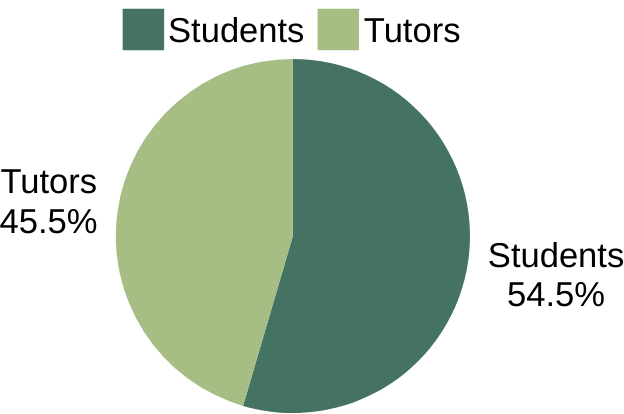
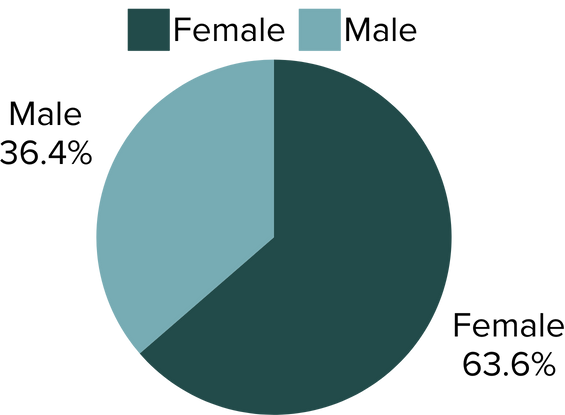
We tested the prototype with 11 participants: 6 students and 5 Medicine Tutors. All users signed a consent form and completed a list of tasks within the prototype.
Below, you will find the results and possible usability issues that students and tutors encountered while navigating the app. These issues were documented in a final form filled out by users, where they provided suggestions, highlighted problems, pointed out inaccuracies, and recommended areas for improvement. Additionally, they completed a System Usability Scale (SUS) questionnaire.
Usability Testing Tasks
Student Interface
To test the student interface, we selected five key tasks that students are expected to perform:
- Perform self-assessment for the next evaluation (USF) with the following autonomy levels:
- MEC14 - N1
- MEC15 - N3
- MEC16 - N3
- What is the response after submitting the self-assessment?
- Check the evaluation obtained in USF4.
- What was the autonomy level achieved in MEC 3?
- View the number of approved MEC points.
- What is the approved point value?
- View the procedure for MEC 1 or "Person-Centered Medical Approach."
- How many steps does this MEC have?
- Request a re-evaluation of MEC 3.
- What feedback was received?
Tutor Interface
To test the tutor prototype, we selected five key tasks:
- Check when the next evaluation is scheduled.
- What is the date and time of the next evaluation?
- Perform an evaluation for USF5 for the student Maria do Mar with the following autonomy levels:
- MEC14 - N1
- MEC15 - N2
- MEC16 - N2
- What feedback is received after submitting the evaluation?
- View the procedure for MEC 1.
- How many steps does this MEC have?
- Check the calendar.
- On what date is the next evaluation?
- Approve a student's request to re-evaluate MECs in the next USF.
- What feedback was received?
Results
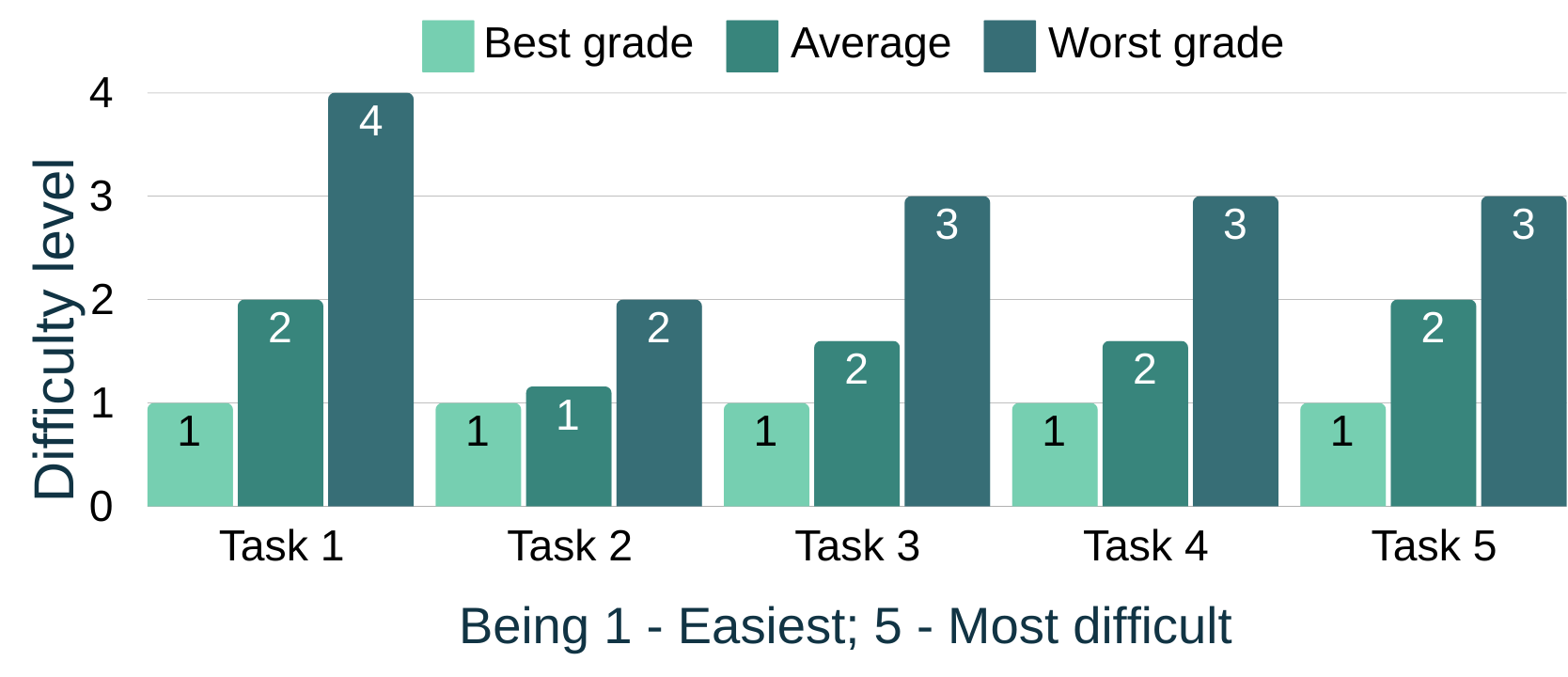
Student Results
| Task | Description |
|---|---|
| TASK 1 | Perform self-assessment for the next evaluation (USF) with predefined autonomy levels. |
| TASK 2 | Check the evaluation obtained in USF4. |
| TASK 3 | View the number of approved MEC points. |
| TASK 4 | View the procedure for MEC 1 or "Person-Centered Medical Approach." |
| TASK 5 | Request a re-evaluation of MEC 3. |
Tutor Results
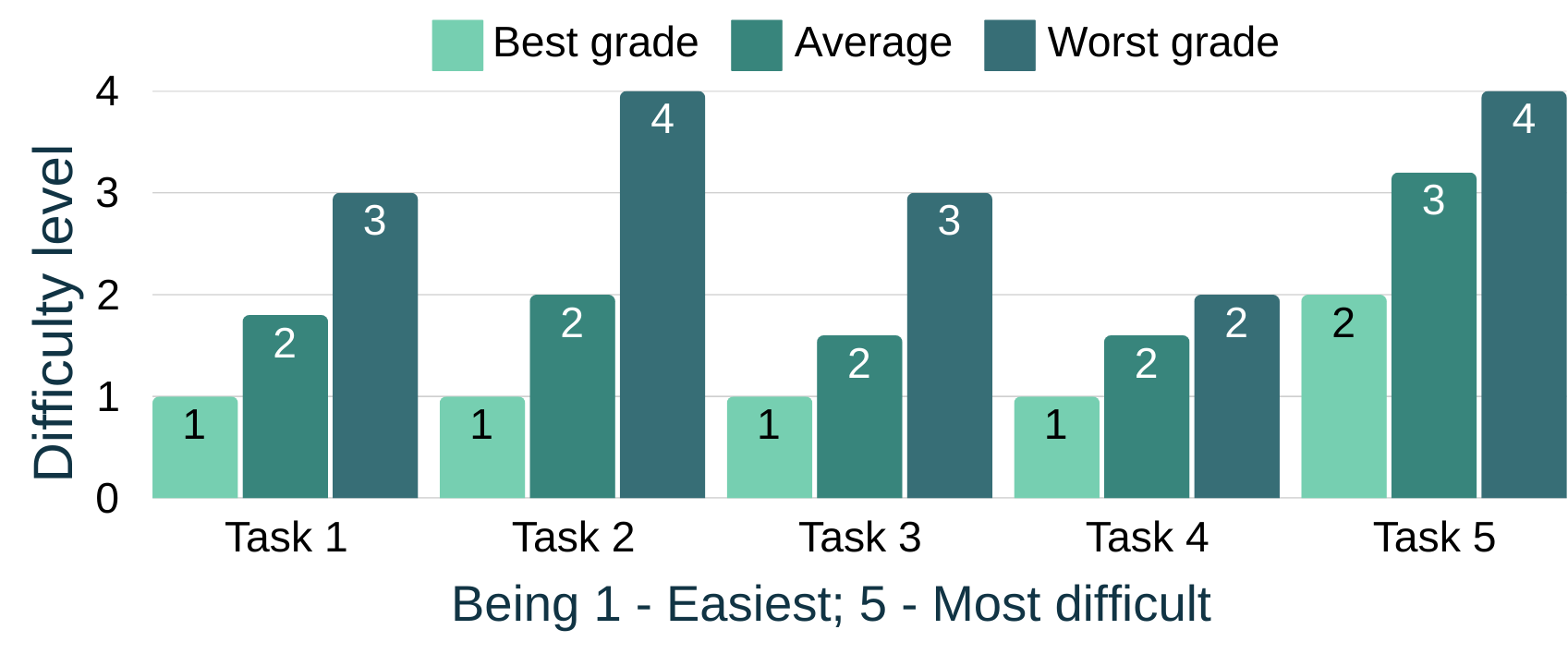
| Task | Description |
|---|---|
| TASK 1 | Check when the next evaluation is scheduled. |
| TASK 2 | Perform evaluation for USF5 for Maria do Mar with predefined autonomy levels. |
| TASK 3 | View the procedure for MEC 1. |
| TASK 4 | Check the calendar. |
| TASK 5 | Approve a student's request to re-evaluate MECs in the next USF. |
Problems and Strengths
Tutor Prototype
Usability Problems
| Problem | Description |
|---|---|
| Task completion color differentiation and text inconsistency | The homepage should have distinct colors and uniform text sizes for upcoming and past evaluations. |
| Difficulty finding the re-evaluation request section | The "Requests" section should specify request and validation dates. |
| Calendar is not intuitive | Users had difficulty finding and understanding evaluation identifiers. |
| MEC Search Button | The search button in the navbar is not intuitive, confusing users. |
Strengths
- Tutors appreciated the statistics feature, finding it particularly useful and engaging.
- The evaluation forms were quite complete. The colors made the form easy to fill out.
Student Prototype
Usability Problems
| Problem | Description |
|---|---|
| Highlight key points in evaluations | When students need to fill in strengths and weaknesses, they often struggle with the forms and need autocomplete suggestions to make it easier. |
| Places to request re-evaluation | The re-evaluation request button on the homepage is not intuitive enough, and there should be access points in the evaluation section. |
Strengths
- The statistics feature was also highly appreciated by students.
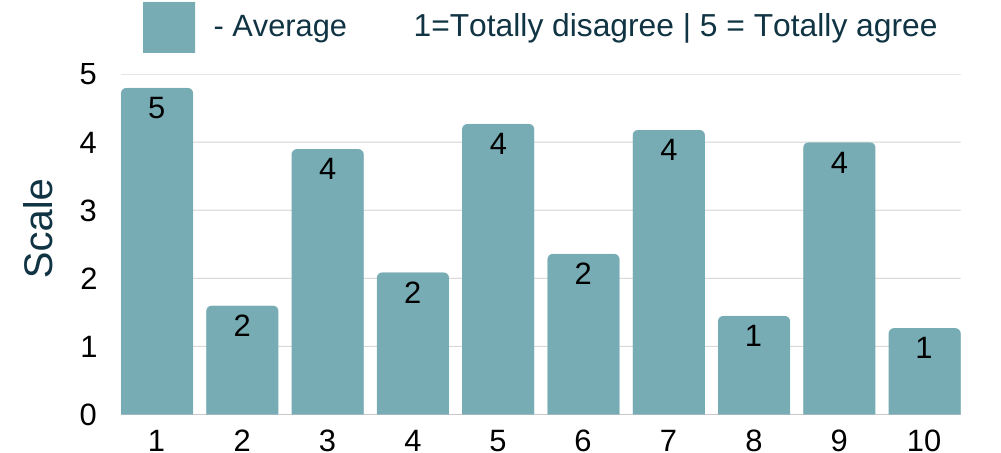
System Usability Scale (SUS) questionnaire
Average SUS Score: 81
User Evaluation Conclusion
Users found the prototype intuitive, easy to use, and well-organized. Initial adaptation was quick, despite some feeling slightly overwhelmed at first.